How I Cut Load Time from ~12s to ~2s: A Longer, More Technical Walkthrough
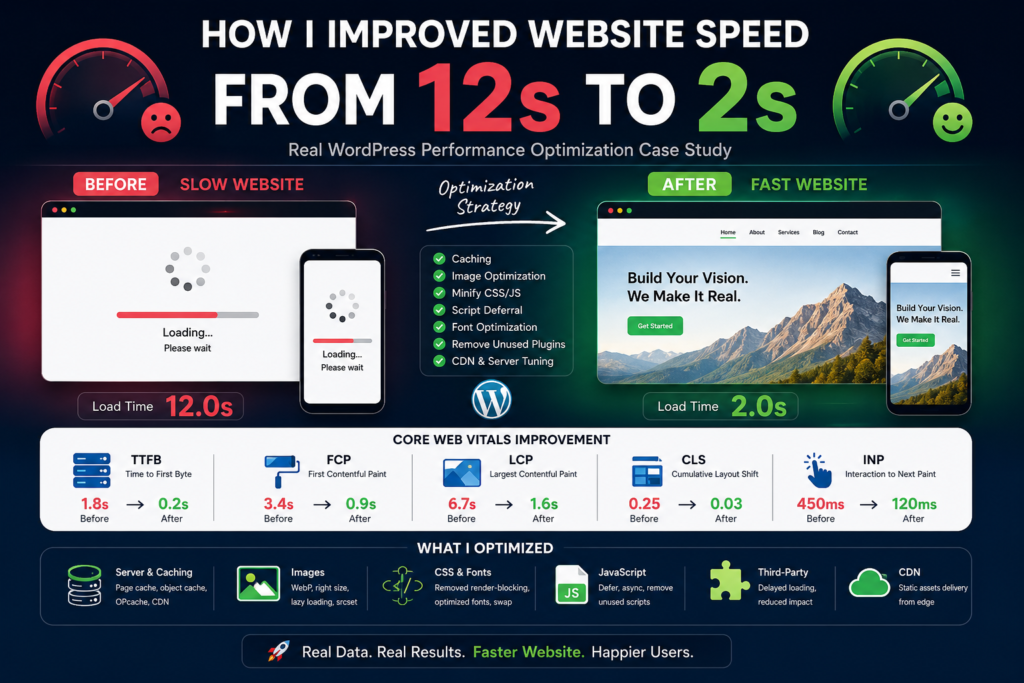
This is the same story as before—a site that felt fine on my desk but was painfully slow in the real world—told with more technical depth: what I measured, what I changed, and what I would do again on the next project.
1. Define the problem in numbers, not feelings
“Slow” is vague. Before changing anything, I anchored the work to observable metrics:
| Metric | What it roughly means |
|---|---|
| TTFB (Time to First Byte) | Server + PHP + DB before HTML starts |
| FCP (First Contentful Paint) | First pixels (text, image, etc.) |
| LCP (Largest Contentful Paint) | Largest visible element—often hero image |
| CLS (Cumulative Layout Shift) | Layout jumping while loading |
| INP (Interaction to Next Paint) | How snappy the UI feels after tap/click |
Tools I used:
- Chrome DevTools → Performance + Lighthouse (local, repeatable).
- Network throttling (Fast 3G / Slow 4G) to simulate real phones.
- WebPageTest for filmstrip, connection profiles, and waterfall from another region.
- Coverage tab (unused JS/CSS) as a hint, not a religion.
Lesson: Optimize for LCP + TTFB first on content sites; INP if you have heavy client-side UI.
2. The waterfall told the truth: too much work before “useful”
On a cold load, the waterfall looked like:
- HTML waits on slow TTFB.
- HTML references many render-blocking CSS/JS files.
- Large images compete with critical resources.
- Third-party scripts (analytics, chat, maps) extend the “busy” period.
So the plan split into four lanes: server/HTML, critical rendering path, media, and JavaScript.
3. Server and TTFB: make the first byte cheap
TTFB is everything that happens before the first byte of the response. For WordPress (which this story fits well), typical levers:
3.1 PHP execution time
- Opcache enabled and properly configured (production).
- Avoid fat
functions.phpdoing heavy work on every request—hook expensive logic to specific contexts (is_admin(), REST, cron, etc.). - Autoloaded options audit:
SELECT option_name, LENGTH(option_value) FROM wp_options WHERE autoload='yes' ORDER BY LENGTH(option_value) DESC LIMIT 20;— huge autoloaded rows hurt every page.
3.2 Database
- Object cache (Redis/Memcached) when traffic or query load justifies it—cuts repeated meta/option reads.
- Query Monitor plugin (staging only) to find slow queries, N+1 patterns, missing indexes on custom tables.
- Limit post revisions and clean spam comments / transients if the DB is bloated.
3.3 Page caching
For anonymous traffic, full page cache (LiteSpeed, WP Rocket, nginx fastcgi_cache, Cloudflare APO, etc.) turns many requests into “serve static HTML.” That is often the difference between hundreds of ms and single-digit ms TTFB at the edge.
Technical takeaway: If TTFB is high with page cache, the origin is still slow or cache is bypassed (cookies, Woo cart, logged-in users, overly broad “don’t cache” rules).
4. Critical rendering path: CSS, fonts, and “above the fold”
4.1 CSS
Problems I see often:
- One giant stylesheet with rules for every template.
- Render-blocking
<link rel="stylesheet">in<head>with no strategy.
What actually helped:
- Split critical vs non-critical mentally: ensure the hero, typography, and layout for first viewport are available early.
- Avoid
@importchains in CSS—they serialize downloads. - HTTP/2 reduces the pain of multiple files, but too many small CSS files still adds overhead—balance merge vs cache granularity.
Reality check: “Critical CSS inlined” is powerful but high maintenance on WordPress unless automated in the build or by a serious optimization plugin. I preferred fewer blocking sheets + smaller global CSS over fragile per-page critical CSS for this project.
4.2 Fonts
Webfonts were a hidden tax:
- Multiple families × weights = multiple files + layout shifts.
Technical fixes:
- Reduced to one family (or one display + one body) and two–three weights max.
font-display: swapso text shows immediately with fallback, then swaps.- Preconnect to
fonts.gstatic.comwhen using Google Fonts; self-host fonts for full control and fewer third-party connections. - Subset fonts (Latin only if you do not need extended scripts).
@font-face {
font-family: “Body”;
src: url(“/fonts/body.woff2”) format(“woff2”);
font-weight: 400 700;
font-display: swap;
}
5. Images: the single biggest front-end win
Images dominated LCP and total bytes.
5.1 Right-sized assets
- Serve width/height that match display, not 4000px originals in a 400px slot.
- Use
srcset+sizesfor responsive images (WordPress does this forwp_get_attachment_imagewhen using core functions).
<img
src=”hero-800.webp”
srcset=”hero-400.webp 400w, hero-800.webp 800w, hero-1200.webp 1200w”
sizes=”(max-width: 600px) 100vw, 1200px”
width=”1200″
height=”630″
alt=”…”
/>
5.2 Modern formats
- WebP broadly; AVIF where acceptable trade-offs on encoding time exist.
- WordPress 5.8+ can generate WebP depending on server support; plugins can help on older stacks.
5.3 Lazy loading and LCP exception
loading="lazy"on below-the-fold images.- Do not lazy-load the LCP image—it delays the metric WordPress and Google care about. In WordPress 5.9+, the first content image in a post may get
fetchpriority="high"in some contexts; for custom themes, set it explicitly on the hero.
<img src=”hero.webp” fetchpriority=”high” decoding=”async” width=”…” height=”…” alt=”…” />
5.4 CLS: dimensions matter
Always width and height attributes (or CSS aspect-ratio) so the browser reserves space before decode. CLS dropped noticeably after fixing “mystery jumps” from late-loading media.
6. JavaScript: defer, delete, and isolate third parties
6.1 Loading strategy
- Default scripts without
defer/asyncblock HTML parsing when placed traditionally. - Prefer
deferfor order-dependent scripts;asyncfor independent snippets (analytics sometimes—trade accuracy vs blocking). - Move non-critical JS to footer or load after interaction (“load maps when user opens map”).
<script src=”/app.js” defer></script>
6.2 Dependency diet
- Removed duplicate libraries (multiple jQuery versions, overlapping sliders).
- Replaced “one plugin for a tiny UI feature” with a few lines of native code where reasonable.
6.3 Third-party scripts
Each vendor script is a DNS + TLS + download + parse + main-thread cost.
Technical mitigations:
- Tag Manager with strict triggers (load on scroll / click / timer only if acceptable).
- Partytown or web worker offloading for some analytics (advanced; not always worth it).
- facade pattern: show a static poster for embedded video/maps until click.
7. Caching layers (stack them, do not duplicate blindly)
A sensible production stack often has:
- Browser cache via
Cache-Control/ETagfor static assets with hashed filenames. - CDN edge (Cloudflare, Bunny, etc.) for static files and optionally HTML.
- Origin page cache for WordPress HTML.
- Object cache for DB hot paths.
Technical pitfall: aggressive “minify + combine” breaking CSS order or deferred CSS causing FOUC. Always verify LCP element, mobile menu, and forms after optimization changes.
8. WordPress-specific checklist (practical)
If your site is WordPress, this is a strong order of operations:
- Page cache for anonymous users; exclude cart/checkout/account as needed.
- Image pipeline: WebP/AVIF, proper sizes, lazy except LCP.
- Plugin audit: deactivate suspects on staging, compare TTFB and main-thread time.
- Database: autoload bloat, revisions, cron health (
wp cron event list). - Theme: remove unused block/CSS from builders; fewer webfont weights.
- CDN for
wp-content/uploadsand static theme assets.
Debugging command (WP-CLI):
wp plugin list –status=active
wp transient list –search=”*_timeout” –format=count
(Exact transient commands vary by WP-CLI version; use as a pattern, not gospel.)
9. What “12s → 2s” actually meant in my case
Honesty matters for technical readers:
- 12s was “time until the page felt usable” on throttled mobile—including third-party widgets and unoptimized hero media, not just TTFB.
- 2s was the same definition after image work + script deferral + caching + removing worst plugins.
If you only look at Lighthouse “Performance” on cable Wi‑Fi, you can fool yourself. I reported numbers with throttling and repeat view (cached) separately.
10. If I were doing it again: a repeatable playbook
- Filmstrip + LCP node (what is LCP?).
- TTFB (origin vs edge; cache hit?).
- Image bytes + lazy flags for LCP candidate.
- Main-thread long tasks (JS).
- Layout shifts (dimensions, fonts, dynamic ads).
- Ship, then regressions guard: periodic Lighthouse CI or RUM (Cloudflare Web Analytics, SpeedCurve, etc.).
Closing
The technical story is mostly measurement, images, render-blocking resources, caching, and third-party control. Framework rewrites rarely beat disciplined asset and request hygiene. Use the metrics above as guardrails, ship incremental fixes, and validate on real devices and networks—that is how a dramatic “12s to 2s” story stays honest and repeatable.
Your emphasis on anchoring optimization efforts to specific metrics like TTFB rather than vague feelings really resonates with my experience seeing sites look fast locally but fail in the wild. I also found your breakdown of the four optimization lanes particularly convincing, especially how render-blocking resources and third-party scripts compound to extend the busy period before the first byte even arrives.
Thank you for the detailed feedback — I really appreciate it. I’ve seen the same pattern many times where a site feels fast in a local environment but struggles under real-world conditions, which is why I wanted to keep the discussion grounded in measurable metrics like TTFB rather than subjective impressions.
I’m also glad the four optimization lanes framework resonated with you. Breaking performance issues into distinct areas helps make the optimization process more systematic and easier to prioritize, especially when dealing with compounded effects from render-blocking assets and third-party scripts.
I really appreciate how you anchored performance improvements to concrete metrics rather than vague impressions. Breaking the optimization into server, critical rendering, media, and JavaScript lanes makes the process much more structured and easier to tackle in practice.
Thank you so much for the thoughtful feedback! I’m glad the breakdown into clear optimization lanes made the approach more practical and easier to follow. My goal was to keep the improvements measurable and structured so the impact of each change can be tracked effectively. Really appreciate you taking the time to share this.