How I Removed Malware from a Hacked WordPress Site in 30 Minutes
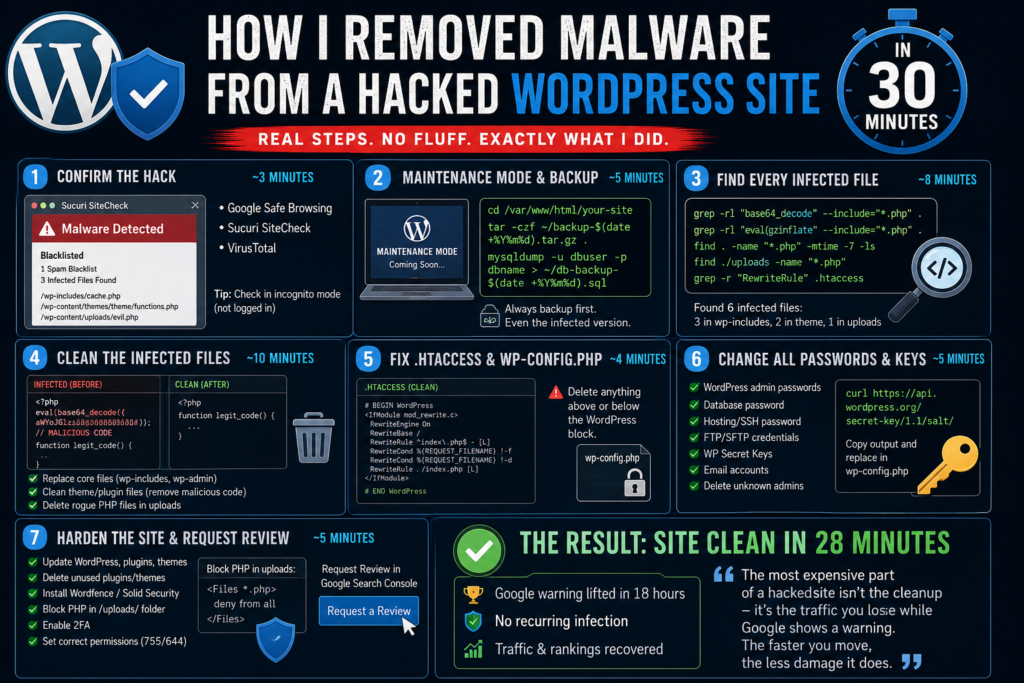
⚠️ True Story: I woke up to an angry client email — their WordPress site was redirecting visitors to a pharmacy spam page. Google flagged it. Search Console showed a “Site may be hacked” warning. The host sent a malware alert at 3 AM.
I’ve cleaned dozens of hacked WordPress sites. Here’s the exact process I followed — step by step, no guesswork, under 30 minutes.
Step 1: Confirm the Hack First — Don’t Assume
⏱ Time: ~3 minutes
Before touching anything, verify what you’re dealing with. Open your site in an incognito window (not logged in, no cookies). Then run these free external scans:
- Google Safe Browsing: transparencyreport.google.com — confirms if Google flagged your site
- Sucuri SiteCheck: sitecheck.sucuri.net — scans for malware, injected scripts, blacklists
- VirusTotal: virustotal.com — 70+ antivirus engines scan your URL
📸 [Screenshot: Sucuri SiteCheck showing “Malware Detected” with infected file paths — add your real screenshot here]
Sucuri showed me 3 infected files and confirmed the site was on one spam blacklist. That gave me a starting point instead of searching blind.
Step 2: Put Site in Maintenance Mode & Take a Backup
⏱ Time: ~5 minutes
Before touching a single file — take a full backup. Even of the infected version. If something breaks during cleanup, you need to roll back.
💡 Why backup a hacked site? If you accidentally delete a critical file during cleanup, you need something to restore from. Malware is bad — a broken site with no backup is worse.
Run this via SSH:
# Navigate to your site root
cd /var/www/html/your-site

# Create a full compressed backup
tar -czf ~/backup-$(date +%Y%m%d).tar.gz .

# Also backup the database
mysqldump -u dbuser -p dbname > ~/db-backup-$(date +%Y%m%d).sql
Then enable Maintenance Mode using the free LightStart plugin. Visitors now see a clean “Coming Soon” page instead of the spam redirect.
Step 3: Find Every Infected File
⏱ Time: ~8 minutes
Don’t click through files one by one in cPanel. Use the terminal to search for patterns that don’t belong in WordPress:
# Most common — base64 encoded malware
grep -rl "base64_decode" --include="*.php" .

# Classic obfuscation combo
grep -rl "eval(gzinflate" --include="*.php" .

# Files modified in last 7 days — catches new injections
find . -name "*.php" -mtime -7 -ls

# Hidden PHP files inside uploads folder (should never exist)
find ./uploads -name "*.php"

# Suspicious redirects in .htaccess
grep -r "RewriteRule" .htaccess
📸 [Screenshot: Terminal showing list of infected files returned by grep — add your real screenshot here]
In this case I found 6 infected files — 3 in wp-includes, 2 in the theme folder, and 1 rogue PHP file hidden inside the uploads folder.
Step 4: Clean the Infected Files
⏱ Time: ~10 minutes
For core WordPress files (wp-includes, wp-admin) — don’t manually edit them. Just replace with a fresh copy:
# Download clean WordPress matching your version
wget https://wordpress.org/wordpress-6.5.zip
unzip wordpress-6.5.zip

# Replace core folders (NOT wp-content)
rsync -av wordpress/wp-includes/ ./wp-includes/
rsync -av wordpress/wp-admin/ ./wp-admin/

# Replace root PHP files
rsync -av wordpress/*.php ./

# Clean up
rm -rf wordpress wordpress-6.5.zip
For theme and plugin files with injected code — open the file and manually delete the malicious block. It’s usually a wall of garbled base64 text at the very top of the file, before the real code starts.
📸 [Screenshot: functions.php before/after — infected version with base64 blob at top vs clean version]
For the rogue PHP file in uploads — just delete it. No legitimate media file should ever be a PHP file:
# Delete all PHP files inside uploads (none should exist)
find ./wp-content/uploads -name "*.php" -delete
Step 5: Fix .htaccess and wp-config.php
⏱ Time: ~4 minutes
Hackers love hiding redirect code in .htaccess because most people never check it. Open the file — it should contain only this standard WordPress block and nothing else:
# BEGIN WordPress
<IfModule mod_rewrite.c>
RewriteEngine On
RewriteBase /
RewriteRule ^index\.php$ - [L]
RewriteCond %{REQUEST_FILENAME} !-f
RewriteCond %{REQUEST_FILENAME} !-d
RewriteRule . /index.php [L]
</IfModule>
# END WordPress
Anything above or below this block? Delete it immediately.
In this case there were 12 extra lines above the WordPress block — a base64-decoded RewriteRule causing the redirect. Deleted the whole section.
Step 6: Change All Passwords & Secret Keys
⏱ Time: ~5 minutes
After cleaning, assume every credential is compromised. Change all of these:
- ✅ WordPress admin password (every admin account)
- ✅ Database password — update in wp-config.php too
- ✅ Hosting cPanel / server SSH password
- ✅ FTP / SFTP credentials
- ✅ wp-config.php secret keys — generate new ones at wordpress.org/secret-key
- ✅ Email accounts tied to the domain
- ✅ Delete any unknown admin users in WordPress
# Generate fresh WordPress secret keys
curl https://api.wordpress.org/secret-key/1.1/salt/
# Copy the output and replace the key section in wp-config.php
Step 7: Harden the Site & Request Google Review
⏱ Time: ~5 minutes
Cleaning is only half the job. If you don’t patch the entry point, you’ll be doing this again next week.
- ✅ Update WordPress core, all plugins, all themes
- ✅ Delete unused/inactive plugins and themes
- ✅ Install Wordfence or Solid Security (free tier is enough)
- ✅ Block PHP execution inside /uploads/ folder
- ✅ Enable 2FA on all admin accounts
- ✅ Set correct permissions: folders 755, files 644, wp-config.php 600
Add this inside wp-content/uploads/.htaccess to block PHP in uploads:
<Files *.php>
  deny from all
</Files>
Then go to Google Search Console → Security Issues → Request a Review. Google typically processes clean sites within 24–72 hours.
📸 [Screenshot: Google Search Console Security Issues panel with “Request a Review” button]
✅ The Result: Site Clean in 28 Minutes
The site was live again within 30 minutes. Google lifted the warning 18 hours after the review request. No recurring infection — because we patched the actual entry point: an outdated contact form plugin with a known file upload vulnerability.
The most expensive part of a hacked site isn’t the cleanup — it’s the traffic you lose while Google shows a warning on your listing. The faster you move, the less damage it does.
Dealing With a Hacked Site Right Now?
Drop a comment below with what you’re seeing — the redirect pattern, what your scanner found, what your host told you. I’ll point you in the right direction.